System Settings
Admin-only system-wide configuration. Access via Settings in the admin sidebar.
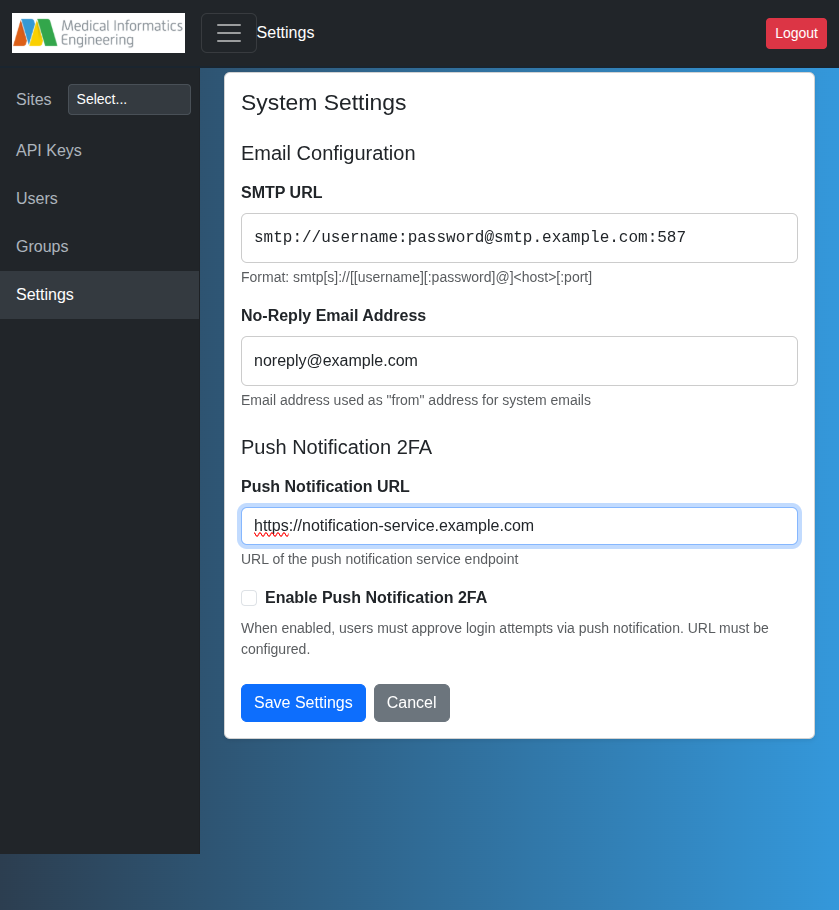
Email (SMTP)
Configure SMTP for password resets and system notifications.
- SMTP URL:
smtp[s]://[[user][:pass]@]<host>[:port] - No-Reply Email: "From" address for system emails (e.g.,
noreply@example.com)
When configured, users can reset passwords via "Forgot your password?" on the login page (reset link valid for 1 hour).
warning
Without SMTP, password resets require manual admin intervention.
Push Notification 2FA
Two-factor authentication via push notifications using the MieWeb Auth App.
Setup
- Enter the Push Notification URL (your notification service endpoint)
- Check Enable Push Notification 2FA
- Save
Flow
- User enters username/password
- Push notification sent to registered device
- User approves/rejects on mobile
- Access granted or denied
Users without a registered device see an error with a link to register.
Notification Service API
POST {notification_url}/send-notification
{ "username": "user123" }
Responses:
{"success": true, "action": "approve|reject|timeout"}{"success": false, "message": "..."}
LDAP Integration
When enabled, AUTH_BACKENDS is set to sql,notification and NOTIFICATION_URL is propagated to the LDAP server environment variables automatically.
Access Control
Requires membership in a group with admin privileges (typically sysadmins). See Users & Groups.